
Instahub lets you trigger SMS and Email messages automatically within any workflow, with no manual sending required. This means the moment a lead fills out a form, books a call, or misses an appointment, your follow-up goes out instantly without anyone on your team lifting a finger.
- To add an automated SMS or Email action to a workflow:
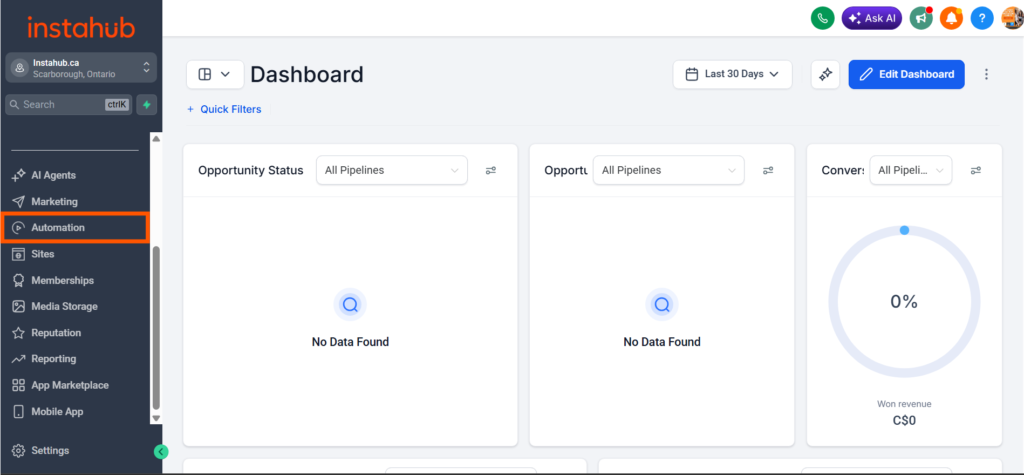
- Click Automations in the left-hand sidebar.
- Select the workflow you want to edit – for example, a “New Lead Follow-Up” workflow triggered when a contact submits a form.
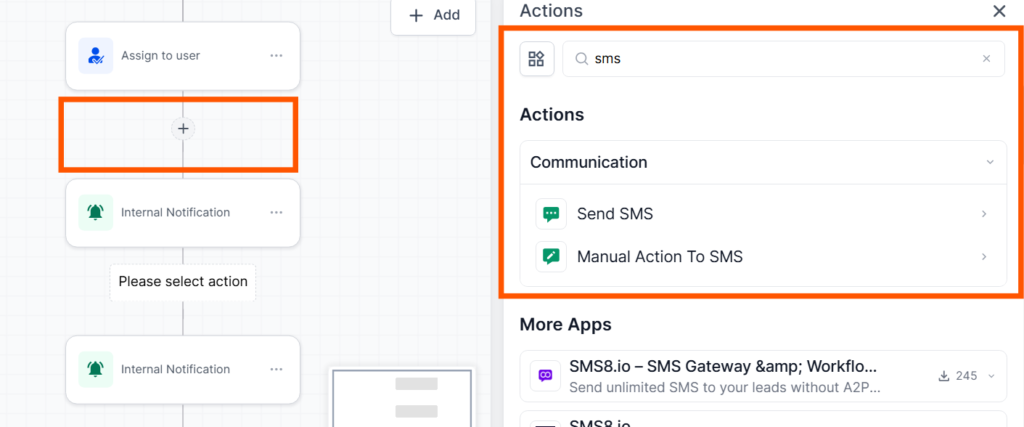
- Inside the workflow, click the + (plus) button at the point where you want the message to fire.
- Under Actions, use the search bar to find either Send SMS or Send Email.
- Select your action, write your message, and save.
A common setup: trigger an SMS within 5 minutes of a new lead coming in, followed by an email 1 hour later if there’s no reply. Instahub handles both automatically once the workflow is live.